The Personaje tab is where you customize Jacky's appearance and select which companion skin is active on your desktop.
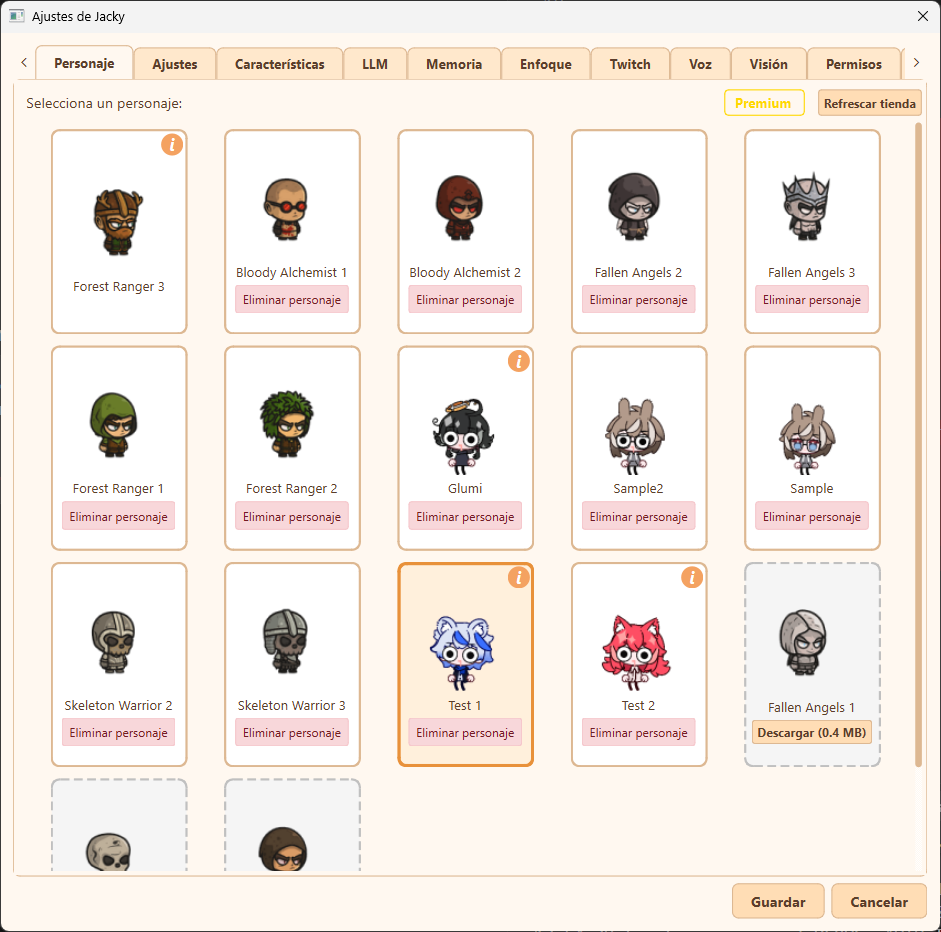
Jacky settings panel showing the Personaje (Character) tab
Key Features:
- Choosing Skins from the Shop: Browse available skins from the online repository. The yellow Premium badge indicates that you have an active Steam subscription. Use the Refrescar tienda (Refresh shop) button to load the latest options.
- Downloading Skins: For skins not yet installed locally, click the dashed card's Descargar (Download) button (which displays the package size, e.g.,
0.4 MB) to download and install them. - Managing Downloaded/Local Skins: Installed skins show their character sprites and names (e.g. Forest Ranger 3, Bloody Alchemist 1, Glumi). You can remove any downloaded skin by clicking its Eliminar personaje (Delete character) button.
- Author Cards: If a skin includes developer metadata, an orange information icon (
i) appears in the top-right corner of the card. Clicking this icon opens the author card, detailing credits, description, and source links. - Selecting a Character: Click on any installed skin card to select it. The active selection will be highlighted with a thick orange border. Click Guardar (Save) at the bottom-right to apply your changes.