
Set up focus timers and application lists to monitor your productivity. Jacky acts as a focus companion during these sessions, keeping you on track and reminding you to get back to work if you drift to distractions.
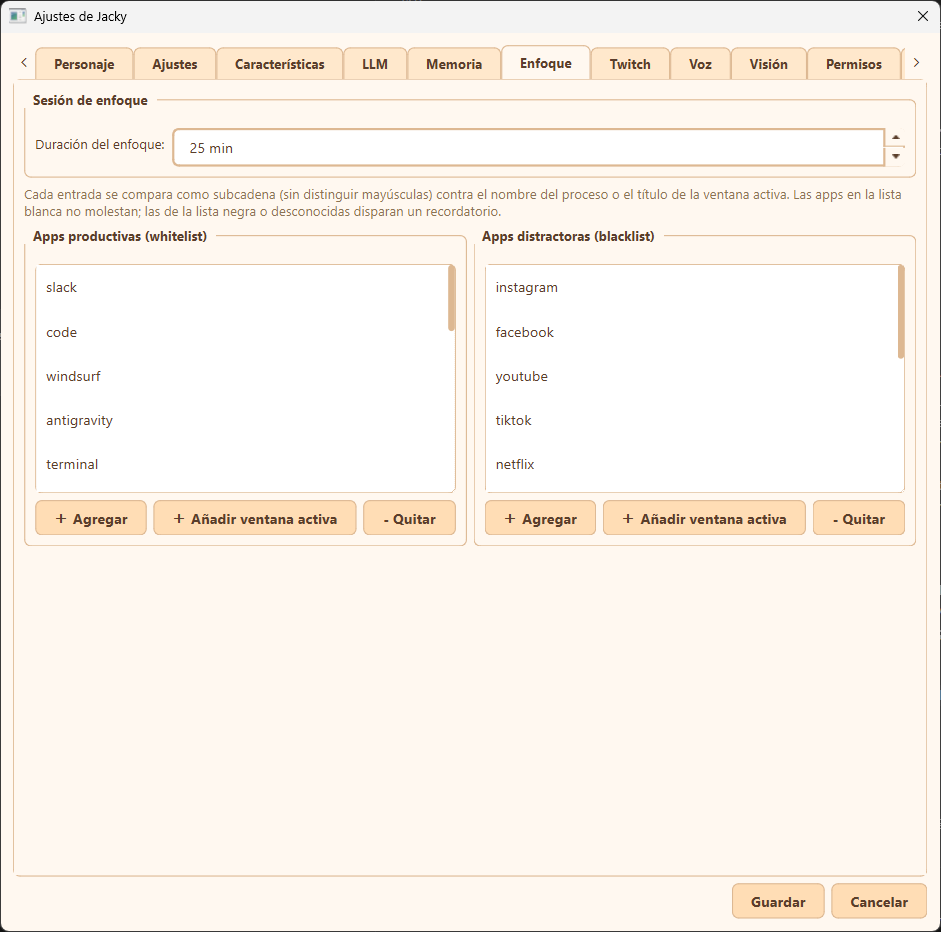
Focus settings tab overview
How Focus Mode Works
When you enable Focus Mode (Pomodoro) via the context menu:
- Silent & Concentrated: Jacky temporarily pauses general chat interactions, random voice prompts, and window push actions. Your original settings are automatically restored when the session ends.
- Working Animations: Jacky cycles between
TYPING(working at a tiny keyboard),WALKING, andIDLEanimations to look busy and work alongside you. - Click to Check Time: Clicking Jacky during a focus session displays a speech bubble with the remaining time in minutes and seconds.
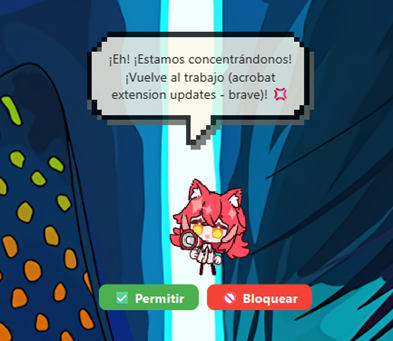
- Distraction Detection: Jacky polls your active foreground window every 3 seconds. If you switch to an unapproved application, a reminder is shown.
Focus settings tab overview
Configuration Options
Focus Session
| Option in UI | Config Key | Range / Type | Description |
|---|---|---|---|
| Duración del enfoque (Focus duration) | productivity_duration_mins | 1 – 240 min (Default: 25) | The length of your focus session in minutes. |
Application Whitelists & Blacklists
Every 3 seconds, Jacky inspects the active window's process name (e.g., chrome) and window title (e.g., GitHub). Each entry in your lists is compared as a case-insensitive substring against those values.
Info
Matching Rule Priority: The window title has higher priority than the process name (allowing you to whitelist/blacklist specific browser tabs). Within each tier, the blacklist has priority over the whitelist.
- Apps productivas (whitelist): Applications and websites where Jacky leaves you alone. If the active window matches any entry here, Jacky stays quiet.
- Apps distractoras (blacklist): Applications and websites classified as distractions. Matching these (or any unknown application) will trigger a gentle reminder to get back to work.
- Unknown Apps: When an active window doesn't match either list, Jacky displays two quick action buttons docked directly under the pet widget:
- + Add to Whitelist (Apps productivas)
- + Add to Blacklist (Apps distractoras) This allows you to classify apps on the fly without opening settings.
Adding and Removing Entries
In the settings tab, you can manage both lists:
- + Agregar (Add): Manually input a process name or title substring.
- + Añadir ventana activa (Add active window): Automatically grabs the process name or title of the currently focused window on your system (excluding Jacky's own settings window) and inserts it.
- - Quitar (Remove): Deletes the selected item from the list.