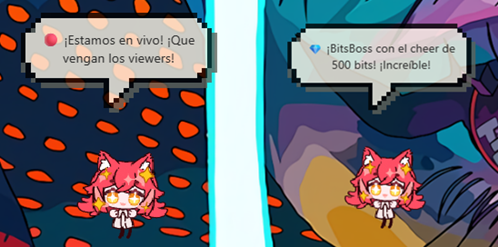
Streamer Mode lets Jacky connect directly to your Twitch channel and react in real time to your stream events. Your viewers will see Jacky celebrate new followers, thank subscribers, welcome raids, and much more — all with custom animations and personalized comments.
How does it work?
Jacky connects to Twitch through the EventSub system, which lets him receive real-time notifications of everything happening on your channel. For this to work, you need to have your Twitch credentials set up beforehand (Client ID and Secret).
Live event reactions
When you're streaming, Jacky automatically reacts to every major event:
New followers
When someone follows you, Jacky plays a happy animation and shows a speech bubble welcoming them. If you get multiple followers in a row, he groups them to avoid spam: "X, Y and 2 others just followed!"
Subscriptions
When someone subscribes to your channel, Jacky dances and personally thanks the new subscriber with an on-screen message.
Gift subscriptions
If someone gifts subscriptions to other viewers, Jacky dances and thanks the person who gifted them.
Bits (Cheers)
When a viewer sends you bits, Jacky shows a celebration animation and thanks them for the gesture.
Raids
When another streamer raids you, Jacky reacts with a special attack animation followed by dancing, and welcomes the incoming viewers.
Personalized AI comments
If you have LLM dialogue enabled, Jacky generates unique, personalized comments for each event. This means he'll never say exactly the same thing twice, making your streams feel more lively and authentic.
Idle behavior
While Jacky waits between stream events, he uses a calm, relaxed animation loop that alternates between:
- Rocking gently in place.
- Walking calmly across the screen.
- Resting peacefully.
These movements happen every 10 to 20 seconds and are deliberately gentle so they don't distract your viewers or cover important game elements or content you're showing.
What happens when the stream ends?
Jacky automatically detects when your channel goes offline. At that point:
- He shows a goodbye bubble thanking all viewers.
- Waits 5 seconds.
- Automatically disables Streamer Mode.
You don't have to do anything manually — Jacky handles everything.
How to activate it?
- Make sure you've set up your Twitch credentials in Settings → Twitch.
- Enable Streamer Mode from Jacky's context menu (right-click on Jacky).
- If additional authentication is required, Jacky will show you a widget with a URL and a code so you can authorize the connection from your browser.
Event grouping: During activity spikes like follow trains, Jacky groups events within a 2-second window to avoid flooding your screen with notifications. For example, if 5 people follow you almost at the same time, Jacky announces them all in a single message.
Not seeing reactions? Make sure your Twitch credentials are properly configured in the Twitch Integration section. Without credentials, Jacky can't connect to receive events.