
Configure screen interaction capabilities, local coordinate mapping, and visual element detection engines.
Permission Required: For security and privacy, you must explicitly enable the See screen (allow_vision) permission in the Permissions settings tab. Without this permission, all screen processing and interaction steps will be disabled.
Debugging Screen Processing: When debug mode is enabled, the intermediate screen processing steps (including screenshots, scan contact sheets, verified tiles, and set-of-mark overlays) are stored locally in the ~/.jacky/debug_screens directory.
Screen Interaction Engine
Jacky uses computer vision to interact with elements on your screen (clicking, closing, minimizing windows, typing text). Locating a target always follows the same fallback chain — Scan Vision first, then cheaper or more specialized methods if that fails:
User says "click the Chrome icon"
    │
    v
┌─────────────────────┐
│   Intent Detection   │  keyword match → fast path
│                      │  LLM classify  → fallback
└──────────┬──────────┘
           v
┌─────────────────────┐
│    Scan Vision      │  Native tiles → ranked candidates
│     (primary)       │  → verify → coordinates
│                     │  → optional double-zoom refine
└──────────┬──────────┘
           │ (fallback if not found)
           v
┌─────────────────────┐
│    Tiled Vision      │  Single tile pick + coordinate
│    (fallback 1)     │  (cheaper, fewer LLM calls)
└──────────┬──────────┘
           │ (fallback if not found)
           v
┌─────────────────────┐
│  Set-of-Mark (opt-in)│  ONNX UI detection + numbered marks
│    (fallback 2)     │  LLM picks a mark ID
└──────────┬──────────┘
           │ (fallback if disabled / not found)
           v
┌─────────────────────┐
│  Legacy Grid + Subgrid│  8×6 grid, then zoomed sub-grid
│    (last resort)    │
└──────────┬──────────┘
           v
┌─────────────────────┐
│  Walk to target      │  Pet runs to the coordinates
└──────────┬──────────┘
           v
     confidence ≥ 90?
      ╱          ╲
    YES           NO
     │             │
     v             v
  Execute    ┌──────────────────┐
     ^       │  Local refine     │  1024×1024 crop
     │       │  near the pet     │  → offset correction
     │       └────────┬─────────┘
     │                │
     └────────────────┘
           v
┌─────────────────────┐
│  Execute action      │  Click / close / minimize / type
└─────────────────────┘
1. Scan Vision (Primary)
Scan Vision is the default locate pipeline. It keeps native screen resolution and verifies multiple candidate regions before committing to a click point:
Full native screenshot
        │
        v
┌───────────────────────┐
│  Split into tiles      │  Overlapping ~896px squares
│  Build contact sheet   │  Numbered thumbnails (1…N)
└───────────┬───────────┘
            v
┌───────────────────────┐
│  Rank candidates       │  LLM: "which tiles look right?"
│  (up to 3)             │  e.g. tiles 7, 8, 3
└───────────┬───────────┘
            v
┌───────────────────────┐
│  Verify each tile      │  Full-res tile → "is target here?"
│                        │  Keep best found + confidence
└───────────┬───────────┘
            v
┌───────────────────────┐
│  Coordinate refine     │  Target as % of the tile
│                        │  → native click point
└───────────┬───────────┘
            v
┌───────────────────────┐
│  Optional double-zoom  │  Tight ~500px crop (strong
│                        │  providers only)
└───────────────────────┘
A contact sheet looks conceptually like this — each cell is a native-resolution tile thumbnail:
┌────┬────┬────┬────┐
│ 1  │ 2  │ 3  │ 4  │
├────┼────┼────┼────┤
│ 5  │ 6  │ 7★ │ 8★ │   ★ = ranked candidates
├────┼────┼────┼────┤
│ 9  │ 10 │ 11 │ 12 │
└────┴────┴────┴────┘
         │
v verify 7, then 8 …- Contact sheet (ranked candidates): Capture the screen at full native resolution, split it into overlapping square tiles, and arrange them into a numbered thumbnail grid. The LLM returns up to three candidate tiles ranked by likelihood — not just a single guess.
- Verify loop: Each candidate tile is sent individually at full resolution so the LLM can confirm whether the target is actually visible and how confident it is. Weak or rejected candidates are discarded.
- Full-resolution coordinate estimation: The best verified tile is sent again at native resolution. The LLM estimates the target's position as a percentage of the tile (0–100% horizontally and vertically), which maps to a precise click point.
- Optional double-zoom refine: On stronger vision providers, Jacky can crop a tight region around that point and ask for one more offset correction before the pet starts walking.
Why this is the default: A single wrong tile pick used to waste the whole attempt. Ranking several candidates and verifying them recovers from bad first guesses and works more consistently across LLM providers — not only with the strongest models.
2. Tiled Vision (Fallback 1)
If Scan Vision cannot verify a target, Jacky falls back to the cheaper tiled pipeline:
Same contact sheet
        │
        v
  Pick ONE tile  →  (optional verify if Burn Tokens)
        │
        v
  Full-res coordinates  -or-  sub-grid refine
Same native-resolution tiles, fewer LLM calls.
3. Set-of-Mark (Opt-in Fallback 2)
When Use object detection (Set-of-Mark) is enabled, Jacky can fall back to a local ONNX OmniParser model that detects interactable UI elements and labels them with numbered boxes:
Screenshot
    │
    v
ONNX OmniParser  →  numbered boxes on buttons / icons / inputs
    │
    v
LLM picks mark #12  →  click the box center
SoM is off by default. It helps most with standard Windows UI chrome; it is less useful for custom icons, games, or non-standard graphics.
4. Coarse Grid & Sub-grid (Last Resort)
If every earlier method fails, Jacky uses the legacy grid finder. An 8×6 numbered grid is overlaid on a resized screenshot:
┌────┬────┬────┬────┬────┬────┬────┬────┐
│  1 │  2 │  3 │  4 │  5 │  6 │  7 │  8 │
├────┼────┼────┼────┼────┼────┼────┼────┤
│  9 │ 10 │ 11 │ 12 │ 13 │ 14 │ 15 │ 16 │
├────┼────┼────┼────┼────┼────┼────┼────┤
│ 17 │ 18 │ 19 │ 20 │ 21 │ 22 │ 23 │ 24 │
├────┼────┼────┼────┼────┼────┼────┼────┤
│ 25 │ 26 │ 27 │ 28 │ 29 │ 30 │ 31 │ 32 │
├────┼────┼────┼────┼────┼────┼────┼────┤
│ 33 │ 34 │ 35 │ 36 │ 37 │ 38 │ 39 │ 40 │
├────┼────┼────┼────┼────┼────┼────┼────┤
│ 41 │ 42 │ 43 │ 44 │ 45 │ 46 │ 47 │ 48 │
└────┴────┴────┴────┴────┴────┴────┴────┘
         │
         v crop cell → green 8×6 sub-grid → finer point
It works with any vision-capable provider, but it is the least precise option.
After Arrival
Once Jacky walks to the located point:
Pet arrives at target
         │
         v
   confidence ≥ 90?
    ╱            ╲
  YES             NO (or Groq / forced providers)
   │               │
   v               v
Execute      1024×1024 local refine
action       → correct residual offset
               → then execute
Some providers (notably Groq) always refine on arrival to correct residual offset before the click, close, minimize, or type action.
Configuration Options
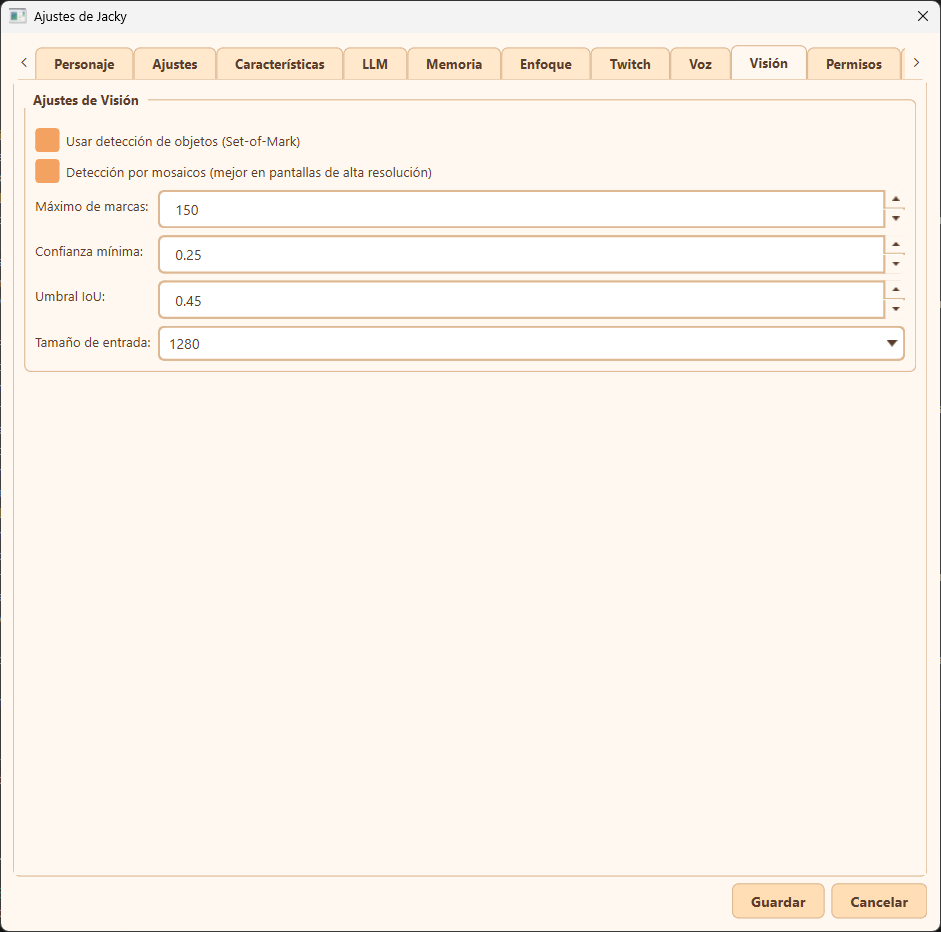
Usar detección de objetos (Set-of-Mark) / Use object detection
Toggle the local ONNX-based OmniParser object detector used by the Set-of-Mark fallback.
- Enabled: Detects clickable UI elements and overlays numbered boxes for the LLM to choose from when Scan/Tiled Vision fail.
- Disabled (Default): Skips Set-of-Mark entirely; Scan → Tiled → legacy grid still run.
Detección por mosaicos (mejor en pantallas de alta resolución) / Tiled detection
Enables tile-based inference for the Set-of-Mark detector on high-resolution displays.
- When enabled, Jacky slices the screenshot into overlapping chunks (defined by Input size), runs local element detection at native resolution on each tile, and merges the results.
- Why use it? Resizing large screenshots (e.g., 4K displays) down to standard sizes makes small icons pixelated or invisible to the detector. Tiled detection keeps small elements sharp.
Máximo de marcas / Maximum marks
The maximum number of numbered boxes to draw on the screen (default 80).
- Limiting this number prevents the screenshot from becoming cluttered with too many visual marks, which helps keep the LLM's context size manageable and prevents confusion.
Confianza mínima / Minimum confidence
The confidence threshold (from 0.0 to 1.0) for the ONNX object detector (default 0.25).
- Detections with confidence scores below this value are discarded.
- Tip: Lowering this value displays more potential UI elements but can introduce noise (false positives). Raising it filters out weak detections but might miss smaller or non-standard buttons.
Umbral IoU / IoU threshold
The Intersection over Union (IoU) threshold used to deduplicate overlapping boxes (default 0.45).
- Non-Maximum Suppression (NMS) uses this to determine when two overlapping boxes refer to the same element.
- A higher value allows more overlapping/nested marks (e.g., an icon inside a button), while a lower value merges adjacent or nested boxes into a single mark.
Tamaño de entrada / Input size
The resolution (e.g., 1280) that each screenshot/tile is scaled to before running the Set-of-Mark detector.
- Default is
1280because the underlying OmniParser model was pre-trained on1280x1280images.
Tiled Vision (Native Resolution)
These settings control the native-resolution tile pipelines used by Scan Vision and the Tiled Vision fallback.
Activar pipeline de visión por mosaicos / Enable tiled vision pipeline
Keeps the Tiled Vision fallback available (default on). Disabling this removes the cheaper single-tile fallback after Scan Vision fails.
Tamaño de mosaico / Tile size
Native pixel size of each square tile (default 896). Larger tiles mean fewer pieces and more context per image; smaller tiles preserve fine detail on 4K/ultrawide screens.
Solapamiento de mosaicos / Tile overlap
How much neighboring tiles overlap (default 0.1 = 10%). Overlap reduces misses when a target sits on a tile boundary.
Confianza mínima LLM / Min LLM confidence
Minimum confidence the LLM must report when picking a tile in the Tiled Vision fallback (default 50).
Umbral de verificación / Verify threshold
When Burn Tokens is active, confidence below this value (default 80) triggers per-tile verification before coordinate estimation in the Tiled Vision fallback.