
Configure widgets and movement mechanics.
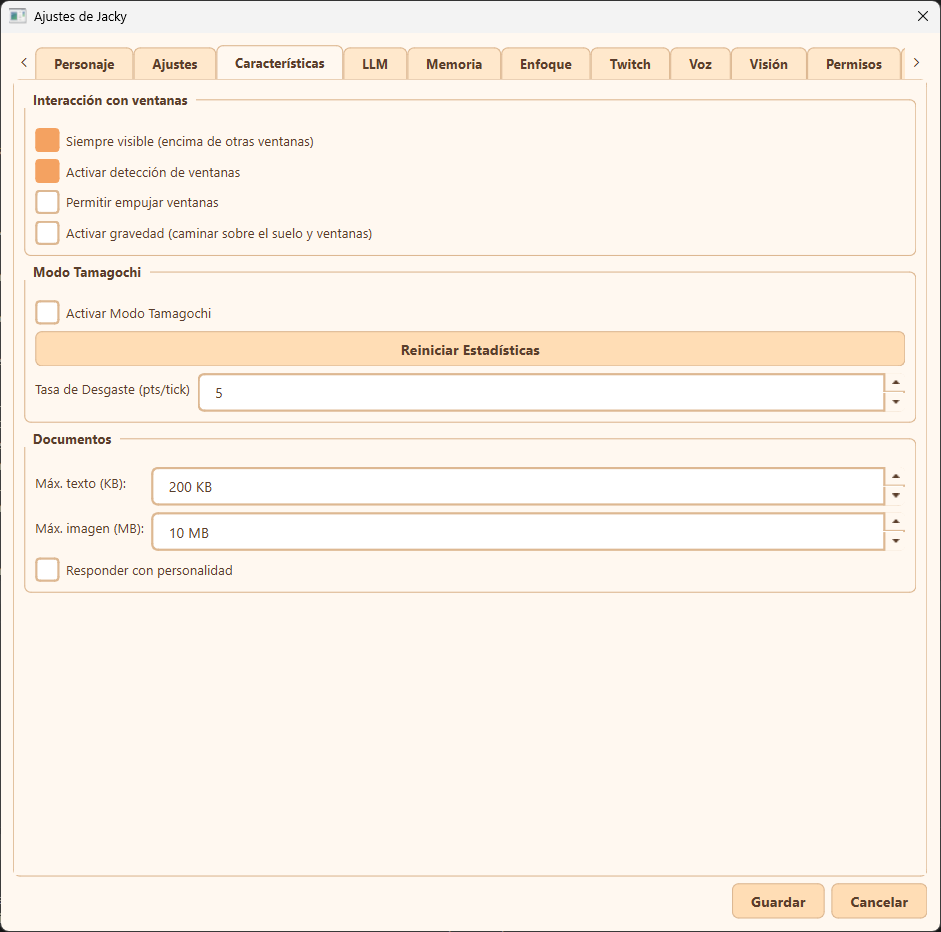
Features tab overview
The Características (Features) tab is divided into three main configuration areas:
Window Interaction (Interacción con ventanas)
These settings control how Jacky behaves relative to other windows on your desktop:
- Always visible / Always on top (Siempre visible): Keeps Jacky on top of all other screens so they don't get covered by other windows.
- Enable window detection (Activar detección de ventanas): Detects new windows or when windows are closed, minimized, or maximized, allowing Jacky to comment on those events.
- Allow push windows (Permitir empujar ventanas): The general control to allow Jacky to interact with windows physically, enabling them to push, minimize, reorder, shake, etc.
- Activate gravity (Activar gravedad): Enables Jacky's physics, allowing them to walk on top of screen borders and other open window titles.
Follow Cursor
Make Jacky chase your mouse cursor around the screen:
- Follow cursor: When enabled, Jacky walks toward your mouse cursor, runs when it's far away, and stops when he catches it. Random scheduled walks are suppressed while this is active.
- Shortcut: Global hotkey to toggle follow-cursor on or off at any time. Defaults to
Ctrl+Shift+Fand is rebindable.
Info
Follow cursor respects exclusion zones, gravity mode, and all interaction states — Jacky won't interrupt conversations, screen interactions, or other activities to chase the cursor. Zero overhead when disabled.
Tamagochi Mode (Modo Tamagochi)
Simulate pet needs and interactions:
- Activate Tamagochi Mode (Activar Modo Tamagochi): Enables the Tamagochi mechanics and widget on your desktop, requiring you to feed or interact with Jacky.
- Reset Stats (Reiniciar Estadísticas): Instantly resets all pet needs and stats to their default healthy state.
- Decay Rate (Tasa de Desgaste): Sets the decay rate (points per tick) for the Tamagochi's needs.
Documents (Documentos)
Configure document file size limits and chat response behaviors when dropping files onto Jacky:
- Max text size (Máx. texto): The maximum file size (in KB) supported for text documents dropped onto Jacky.
- Max image size (Máx. imagen): The maximum file size (in MB) supported for images dropped onto Jacky.
- Respond with personality (Responder con personalidad): Toggle whether Jacky responds with their mascot personality style in the document chat.
Info
For more details on how to drag-and-drop analyze files and use the screen selection tool, see the Document & Screen Analysis guide.