
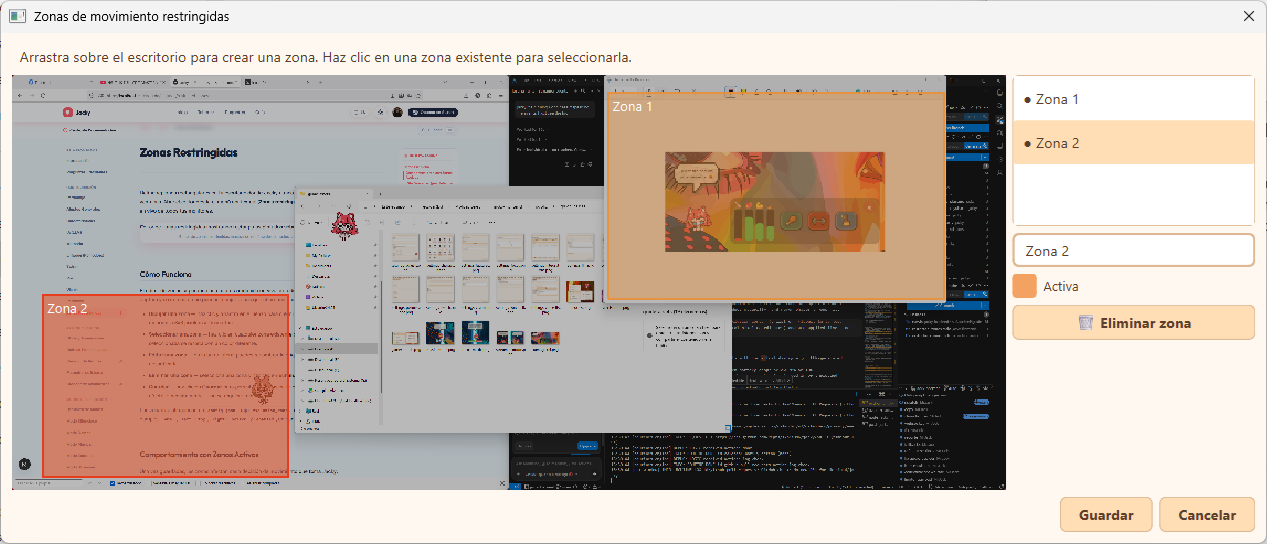
Define rectangular regions on your desktop where Jacky should never go, peek, sit, or target any window. Open the editor from the context menu (Restricted zones) and paint zones over a live screenshot of all your monitors.
How It Works
The zone editor overlays a scaled-down live screenshot of your entire virtual desktop. Each monitor is captured and stitched together so you can draw zones spanning across multiple screens.
- Draw a zone — click and drag on the canvas to create a new rectangular zone. Zones smaller than 8×8 pixels are discarded.
- Select a zone — click any existing zone to select it. The selected zone is highlighted with a different color.
- Edit a zone — in the sidebar you can rename the zone label or toggle it on/off.
- Delete a zone — select a zone and click Delete (Eliminar).
- Save — click Save (Guardar) to persist zones to your configuration. Changes take effect immediately — no restart needed.
Zones are stored in config.json under exclusion_zones as a list of objects with label, left, top, right, bottom, and enabled fields, in Qt logical pixel coordinates.
Behavior When Zones Are Active
Once zones are saved, they affect every movement decision Jacky makes:
- Random walks — any target that overlaps a zone is rejected and a new one is picked.
- Peek and sit — window interactions that would place Jacky inside a zone are skipped.
- Window targeting — screen interaction click targets inside zones are ignored.
Without Gravity (default)
With gravity off, Jacky can roam freely across all screen areas. When zones block a direct path, Jacky uses an L-shaped waypoint to route around them — walking horizontally past the zone first, then vertically to the target.
With Gravity
With gravity enabled, exclusion zones behave like solid walls and platforms:
- Jacky can stand on top of a zone — it acts as a landing surface, just like a window title bar.
- Jacky walks off the edges naturally, never phasing through a zone.
- Zones block horizontal walking paths at their vertical level, preventing Jacky from passing through.
- Vertical fly-around waypoints are disabled, since the pet cannot ascend through air.
Escape Mechanism
If Jacky ever finds himself inside a zone (e.g., because a zone was created around him or he was dragged into one), he automatically teleports to the nearest free position. This is handled every tick by check_and_escape_exclusion and is transparent to the user.
Config Reference
| Key | Type | Default | Description |
|---|---|---|---|
exclusion_zones | array | [] | List of off-limits rectangles |
exclusion_zones[].label | string | "#N" | Human-readable zone name |
exclusion_zones[].left | int | — | Left edge in Qt logical pixels |
exclusion_zones[].top | int | — | Top edge in Qt logical pixels |
exclusion_zones[].right | int | — | Right edge in Qt logical pixels |
exclusion_zones[].bottom | int | — | Bottom edge in Qt logical pixels |
exclusion_zones[].enabled | bool | true | Whether this zone is active |
Disable a zone instead of deleting it if you want to keep it for later. Disabled zones are shown in the editor as gray rectangles and have no effect on movement.